
Docs
The interface
Exploring the Scene Cut workspace: video, subtitle list, timeline, and tools.
Scene Cut's interface is organized around a simple idea: everything you need for subtitling should be visible and accessible at the same time -- the video, the text, and the audio waveform.
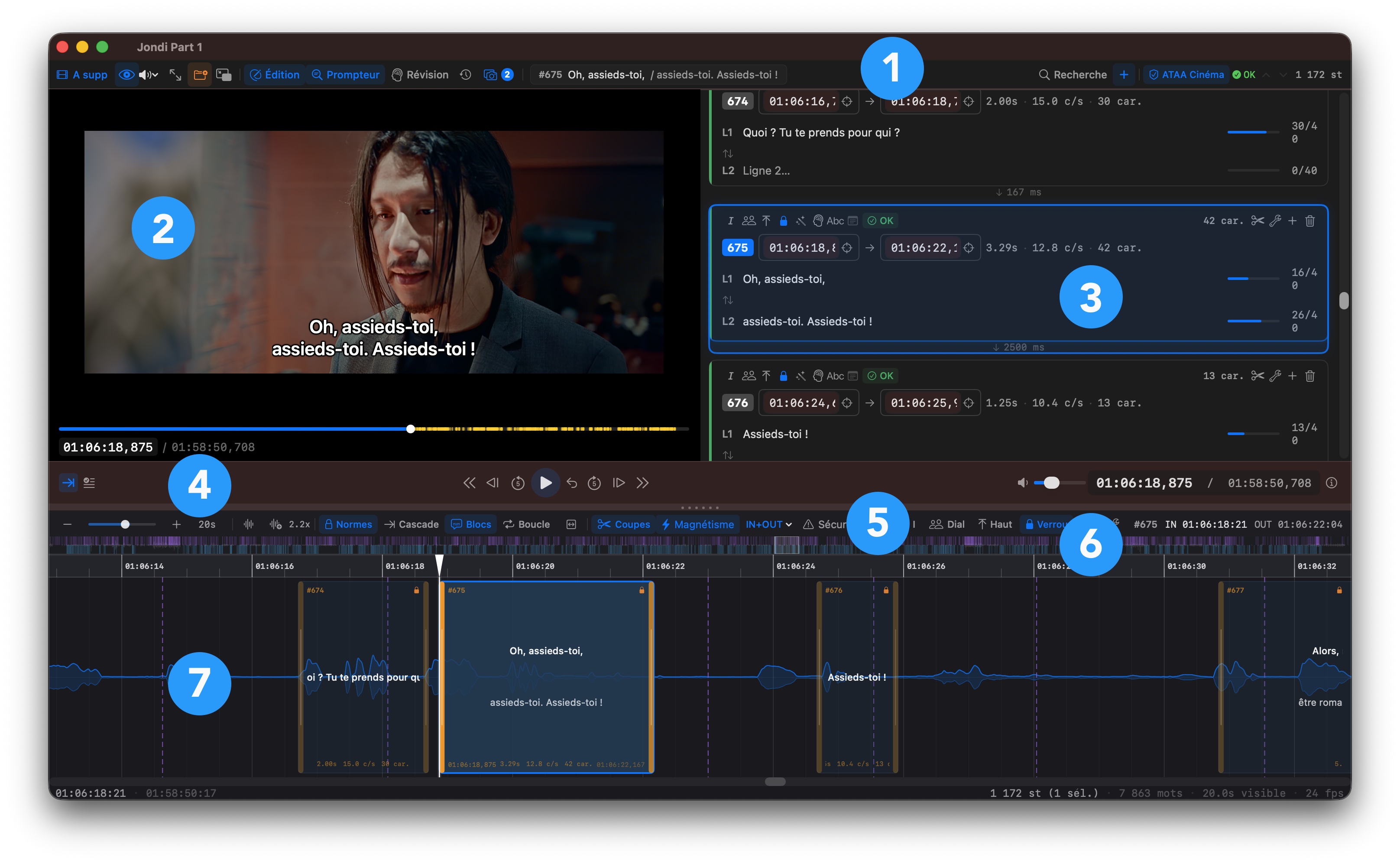
The workspace is made up of seven areas, labeled in the image above:
- The toolbar -- quick access to the main functions: media source, work modes, validation profile, subtitle creation
- The video player -- real-time preview with subtitles overlaid exactly as they will appear to the viewer
- The subtitle list -- text editing, timecodes, validation indicators, and quick actions per entry
- The timeline toolbar -- zoom, audio gain, display options (blocks, scene cuts, cascade, snapping)
- The transport bar -- playback controls, subtitle navigation, and tracking options
- The minimap -- project overview for quick navigation in feature-length projects
- The timeline -- the audio waveform with subtitle blocks and scene cuts
Each area is detailed in the following pages. The key takeaway to get started: the layout is designed to keep your eyes on the video while working on text and timing. The size of each area can be adjusted by dragging the separators to suit your preferences.
The timeline height and the width between the video player and the subtitle list are adjustable by simply dragging the separators.