
Subtitle Formats
Each subtitle format serves a different purpose. The choice depends on where the file is going -- streaming platform, broadcaster, or movie theater.
Overview
| Format | Extension | Primary use | Encoding |
|---|---|---|---|
| SRT | .srt | Universal -- platforms, players, editing | UTF-8 |
| WebVTT | .vtt | Web and streaming (YouTube, HTML5) | UTF-8 |
| TTML | .ttml | Netflix, broadcast, IMSC1.1 | UTF-8 |
| EBU-STL | .stl | European broadcast (TV) | ISO 8859-1 |
| DCP | folder | Digital cinema (theater projection) | UTF-8 |
| EDL | .edl | Scene cuts only (no text) | -- |
SRT
The most widely used format. Readable by virtually every video player and platform. It's often the default choice for straightforward deliveries.
Scene Cut exports SRT with italic support (<i> tags) and top-of-screen positioning. The timecode format is HH:MM:SS,mmm.
WebVTT
The standard web format, used by YouTube and HTML5 players. Very similar to SRT in structure, with a WEBVTT header and timecodes in HH:MM:SS.mmm format (period instead of comma).
Italics and top positioning are preserved on export.
TTML (IMSC1.1)
The professional XML format, conforming to the IMSC1.1 profile and compatible with Netflix requirements. It natively supports regions (top/bottom), styles (italic, font, colors), and SMPTE timecodes.
On export, Scene Cut automatically configures the frame rate and multiplier based on the project settings (24, 25, 29.97 fps...).
EBU-STL
The reference binary format for television broadcast in Europe (Tech 3264 standard). Unlike other formats, it cannot be read in a text editor.
The encoding is ISO 8859-1, which means that certain special characters outside this table (emojis, Asian characters) are not supported and will be replaced.
The language code and country code are automatically populated from the active standards profile.
DCP Interop
The format intended for digital cinema theater projection. Export produces a folder containing an XML file and optionally a copy of the font used.
The DCP export dialog offers an options panel accessible via the Show Options button at the bottom of the dialog:
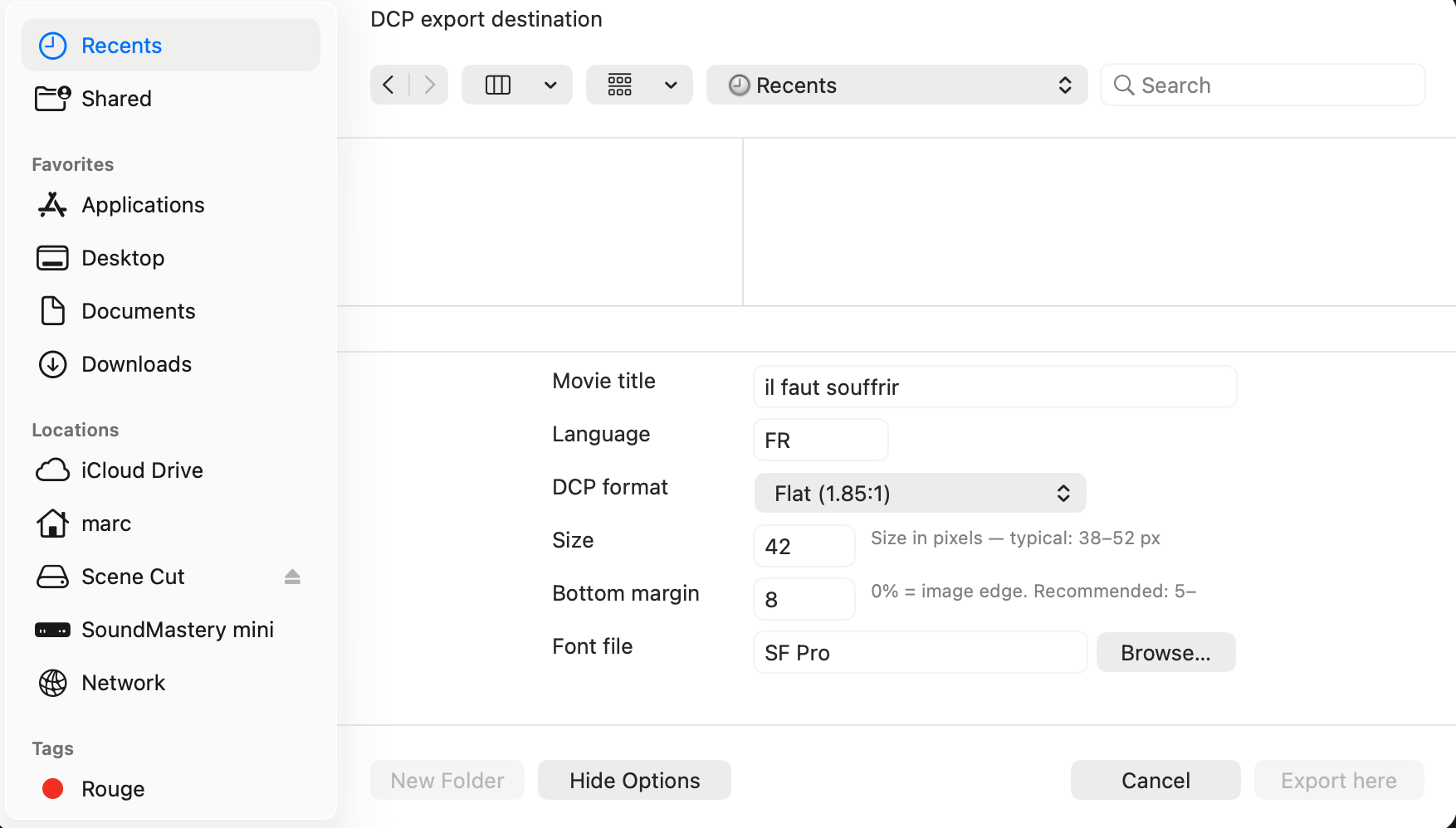
| Option | Description |
|---|---|
| Movie title | Film title, written in the DCP metadata |
| Language | 2-letter code (FR, EN...) |
| DCP format | Flat (1.85:1) or Scope (2.39:1) -- determines the working resolution |
| Size | Font size in pixels, from 20 to 80 (cinema standard: 42) |
| Bottom margin | Distance from the bottom of the screen in percentage (standard: 8%) |
| Font file | Font (TTF/OTF) to embed in the DCP |
EDL (scene cuts)
The EDL export (CMX 3600) does not concern subtitles but the scene cuts detected in the project. It allows sharing the list of shot changes with editing software.
Importing an EDL file works the same way -- it populates the scene cut list on the timeline.